Windsurf vs Cursor Pricing Comparison: Key Insights

a developer at the start of 2026, comparing two AI-powered coding tools: Windsurf and Cursor. The decision isn't just about which one has the snazziest features but also which offers the best value for your money. With pricing structures that appear similar at first glance, a deeper analysis is essential to see which one truly delivers more bang for your buck over time. This "windsurf vs cursor pricing comparison 2026" will break down the numbers, technical specs, and limitations to help you decide.
Winner at a Glance
| Category | Winner | Key Metric |
|---|---|---|
| Free Tier Offerings | Windsurf | Free tier available |
| Pro Subscription Cost | Windsurf | $15/mo vs. Cursor's $20/mo |
| Business Plan Features | Cursor | Centralized billing and admin tools |
| Unique Capabilities | Cursor | .cursorrules for AI behavior |
| Fast Request Quota | Windsurf | No cap on pro plan |
| Integration and UI | Cursor | Built on VS Code |
| Multi-file Editing | Windsurf | Cascade agent mode |
| Community and Support | Cursor | Larger user base |
Cursor and Windsurf offer competitive features but lean towards different user profiles. Cursor shines in professional and team settings with its centralized billing and extensive IDE features, while Windsurf offers a more budget-friendly option, especially appealing for solo developers with its competitive pricing and no fast request cap on the pro plan. This nuanced differentiation is critical when deciding based on your specific needs.
Technical Specs Comparison
| Feature | Cursor | Windsurf |
|---|---|---|
| Context Window | Automatic from open files | Limited to current project scope |
| Max Output | Unlimited on Pro | Dependent on project size |
| Models Available | GPT-4o, Claude Sonnet | Internal AI models |
| API Rate Limits | 500 fast requests/mo on Pro | Unlimited on Pro |
| Languages Supported | Multi-language | Multi-language |
| Unique Features | .cursorrules, Composer | Cascade agent mode |
| UI and User Experience | Built on VS Code | AI-native editor |
| Terminal Integration | Built-in with AI | Built-in with AI |
The primary differentiators between Cursor and Windsurf are evident in features like the context window and API rate limits. Cursor’s automatic context from open files offers smooth integration for developers accustomed to working across multiple files simultaneously. Meanwhile, Windsurf’s unlimited API access on its Pro plan provides an edge for users requiring high-frequency requests. Cursor’s reliance on well-known AI models like GPT-4o and Claude Sonnet could appeal to those needing solid language model support, while Windsurf’s internal models may offer optimized performance tailored to its unique environment.
Performance Analysis
for performance, speed is often as crucial as the breadth of functionality, particularly in environments where rapid iterations are standard. Cursor’s integration into VS Code provides it a solid foundation, but its occasional latency on large codebases can be a bottleneck. With a fast request limit of 500 per month on the Pro plan, heavy users might find themselves throttled during high-demand periods. In contrast, Windsurf, with its AI-native editor structure, may handle requests more fluidly, especially with no such cap on its Pro plan.
Cursor can process a completion in approximately 500 milliseconds, allowing for potentially 120 queries per minute. Windsurf, while no specific benchmarks are available, is optimized for its environment, likely offering competitive speeds but without Cursor’s specification on request throughput. In a scenario where rapid feedback loops are essential, such as live coding sessions, this difference can be significant. Conversely, in a more deliberate development cycle, the speed advantage might not be as critical, allowing Windsurf’s other features to shine.
Reliability is another aspect where Cursor seems to have the upper hand due to its larger user base and more mature ecosystem, which can lead to fewer disruptions and better support. However, Windsurf’s smaller scale might mean less congestion and a more tailored experience, highlighting the importance of context when evaluating these tools.
Pricing and Value
| Plan | Cursor Pricing | Windsurf Pricing |
|---|---|---|
| Free | 2000 completions/mo | Free tier available |
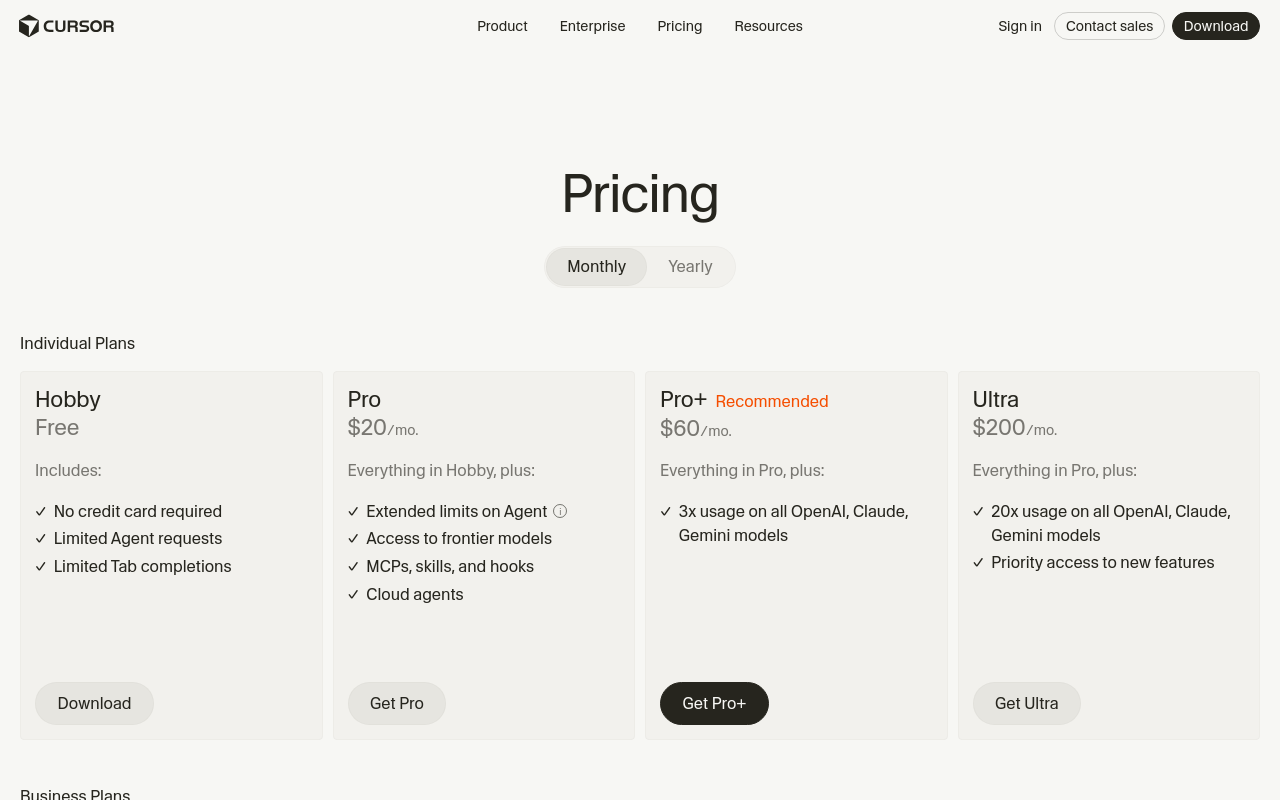
| Pro | $20/mo | $15/mo |
| Business | $40/user/mo | $25/user/mo |
Cursor offers a slightly more expensive Pro plan at $20/month compared to Windsurf’s $15/month. However, Cursor’s Business plan provides centralized billing and administrative controls, which could justify the $40/user/month price for larger organizations. For API pricing, Cursor’s model includes 500 fast requests per month on the Pro plan, whereas Windsurf has no cap, providing more flexibility for intensive users.
Let's crunch the numbers for a 6-month Total Cost of Ownership (TCO) for different profiles:
| User Profile | Cursor 6-Month TCO | Windsurf 6-Month TCO |
|---|---|---|
| Solo Developer (Pro) | $120 | $90 |
| Small Team (3 users, Pro) | $360 | $270 |
| Medium Enterprise (10 users, Business) | $2400 | $1500 |
| Large Enterprise (50 users, Business) | $12,000 | $7,500 |
Windsurf consistently comes out ahead in terms of cost-effectiveness, especially for larger teams or enterprises, where the savings are substantial. However, the additional features and integrations offered by Cursor could tip the scales for developers needing its specific capabilities.
Unique Capabilities
Each tool brings something unique to the table that the other lacks entirely. Cursor, for instance, introduces the .cursorrules feature, allowing developers to define project-specific AI behavior. This capability can drastically tailor the AI's functionality to specific project needs, which is invaluable for development environments with unique requirements. Windsurf, on the other hand, offers its Cascade agent mode, a feature designed for multi-file editing across projects. This can significantly enhance productivity for developers working on complex, interconnected codebases.
Cursor’s Composer feature, which facilitates multi-file generation, positions it uniquely for projects that need extensive code generation with minimal manual input. This functionality could be a big deal for rapid prototyping and iterative development cycles. Windsurf’s built-in terminal AI, while also present in Cursor, is tuned specifically for its environment, potentially offering a more smooth experience for users who prefer its native interface.
The practical impact of these capabilities is significant: Cursor’s rules-based customization and multi-file generation can streamline workflows in environments where precision and customization are paramount. Meanwhile, Windsurf’s agent mode empowers developers to tackle complex projects with a broad overview, which is crucial in large-scale development settings.
Limitations and Honest Criticism
No tool is without its drawbacks. For Cursor, the requirement to switch from your current editor can be a significant hurdle, especially for developers deeply embedded in their existing workflows. Additionally, the $20/month price for solo developers can add up, particularly if the fast request quota is quickly exhausted. Latency issues on large codebases further complicate its appeal, potentially hindering productivity during crucial phases of development.
Windsurf, despite its competitive pricing, struggles with fewer integrations compared to Cursor, which might limit its utility in environments where smooth toolchain integration is necessary. Its smaller user base also means less community support and potentially slower updates or bug fixes. Furthermore, its less mature development environment could pose challenges for developers dealing with modern technologies or complex projects.
Both tools need to address these issues to enhance their value propositions. Cursor could benefit from more flexible pricing or increased quotas for heavy users, while Windsurf might improve by expanding its integration capabilities and development community.
Recommendation by Use Case
| Use Case | Winner | Why | Recommended Plan | Monthly Cost |
|---|---|---|---|---|
| Solo Developer | Windsurf | Budget-friendly, no cap on requests | Pro | $15 |
| Small Team | Windsurf | Cost-effective, Cascade mode | Pro | $45 |
| Medium Enterprise | Cursor | Centralized billing, .cursorrules | Business | $400 |
| Large Enterprise | Cursor | Advanced features, broad integration | Business | $2,000 |
| Prototyping | Cursor | Composer for multi-file generation | Pro | $20 |
| Education | Windsurf | Free tier availability | Free | $0 |
For solo developers and small teams, Windsurf’s cost-effectiveness and no request cap make it the clear winner. Its Pro plan at just $15/month is hard to beat, especially with the inclusion of the Cascade mode for multi-file editing. In contrast, for medium to large enterprises, Cursor’s features like centralized billing and .cursorrules become invaluable, even at the higher monthly cost. Prototyping scenarios benefit from Cursor’s Composer feature, which facilitates extensive code generation.
In educational settings, Windsurf’s free tier is an attractive option, allowing students and educators to explore AI-driven development without financial commitment. Each tool has its niche, making the choice largely dependent on specific needs and budgets.
Final Assessment
In this "windsurf vs cursor pricing comparison 2026," the clear winner varies depending on the user's needs. For budget-conscious developers and teams focused on efficient, cost-effective solutions, Windsurf emerges as the top choice. Its competitive pricing and unlimited request model provide significant advantages in these scenarios. However, for more feature-rich and integrated solutions, particularly in enterprise environments, Cursor holds the edge with its solid capabilities and integration with VS Code.
Despite winning in certain areas, Windsurf can improve by expanding its integrations and enhancing community engagement, while Cursor could reduce its cost barriers and improve latency issues. The decision ultimately hinges on the specific requirements of the user, with Cursor being ideal for those needing advanced features and Windsurf offering unbeatable value for simpler, less demanding use cases.
Frequently Asked Questions
What are the subscription costs for Windsurf and Cursor?
Windsurf costs $15/month while Cursor is priced at $20/month.
Which tool offers a free tier?
Windsurf provides a free tier, unlike Cursor.
What unique feature does Cursor have?
Cursor includes .cursorrules for AI behavior customization.